Review Comments (33) Screenshots (21) Questions & Answers (15/13) Votes (2670) Awards (20) Wiki  
3.9
picasa.google.com
Freeware
461 496 people
Download Picasa

14.22 MBDownloaded 133588 times

This software was checked for viruses and was found to contain no viruses.
Click here to see antivirus report.
 
Video tutorial for Picasa 3.6
Frame
This video tutorial has been acquired from Downloadtube.com

Review

This is official description

Picasa is a software tool that allows you to organize, edit, and share your photos.You can tag your Google friends and share pictures of them, upload and share your photos on Google , Transform your photos with 24 effects, you can compare two different photos side by side and more
 
The following review written by one of the Software Informer contributors applies to version 3.6

Picasa is a perfect picture-editing tool from the giant Google that includes an online photo-sharing feature. The name “Picasa” comes from the Spanish painter Pablo Picasso, and the tool was originally created by Idealab, a part of Google since 2004. Right after acquisition, Google started to offer Picasa as a free download.

Picasa allows you to import photos from almost anywhere, including CDs, memory cards, scanners, webcams, digital cameras, and online Picasa web albums. It offers a wide range of tools to fix and enhance your photos. With its Basic Fixes, you can crop, straighten, reduce the red-eye effect, retouch, and add text to your photos. Similar to the feature you find in Google search, you can use its “I’m Feeling Lucky” to perform a quick all-in-one contrast and lighting fix. With the Tuning feature, you can change the aspect ratio and add highlights to your photos, while its instant twelve easy-to-use Effects, will make your photos looks a lot better with just one click.

Its built-in face recognition feature suggests you how to group your photos according to the similarities it may find in the faces appearing in your pictures. With just a little more work, you can add a Name Tag and a Geo Tag to each photo using Google Maps. This is a very useful feature when you need to classify the people in your collection by location.

Finally, Picasa allows you to share your photos online using Picasa Web Album or by uploading them to Blogger.
  • Supports one-click web album upload.
  • Synchronizes with your Google account.
  • Name tag available.
  • Geo tag support.
  • Supports Mac.
  • None.

Reviewer rating:

Reviewed: Last year

What's new in version 3.9

1.Added ability to upload to Google : share with circles, post pictures to your stream, and upload images at original size.
2.Social Tagging: name tag people in your Google circles and notify them via G .
3.New photo editing effects, including:
Infrared
Lomo-ish
Holga-ish
HDR-ish
Cinemascope
Orton-ish
Sixties
Invert Colors
Heat Map
Nightvision
Cross Process
Posterize
Duo-Tone
Boost
Soften
Vignette/Matte
Pixelate/Focal Pixelate
Focal Zoom
Pencil Sketch
Neon
Comic Book
Border
Rounded Edges
Drop Shadow
Museum Matte
Polaroid
4.Side by side editing: compare two pictures side-by-side, or compare different edits on the same picture.
5.Updated RAW support for pictures from newer cameras.
6.Support for WebP files.
7.On the Tools > Experimental menu, we've added support for migrating your database to another local drive.
8.Improvements to Face Movie maker: number of photos included, chronological ordering.
9.Sync now uploads unshared albums privately.
10.Improved restoring of virtual albums when you uninstall and reinstall, or move to a new computer. Album data is written to the picasa.ini file now, along with all of your other edits.
11.OAuth support: use 2-factor accounts without getting an application-specific password.
12.Fixed various crashes.
13.Fixed name tags and contacts issues.

What's new in version 3.8

Picasa has made it easier to organize your photos without opening your browser. Apply Picnik’s photo-editing awesomeness to your photo and save it back to Picasa. Then make a Face Movie out of your portraits. In this new version, you'll also find an amped up properties panel and a new Batch upload option so you can upload your entire photo collection.
Face Movie--You might be in charge of making a slideshow for a birthday party or wedding. Maybe you have only have two days and all you have is a bunch of group photos. Don’t panic. With the new Face Movie, you can quickly create a slideshow featuring that special someone, centered around that special someone, complete with transitions, music and captions.
Batch Upload -- Manage and organize your photos -- We've improved the the upload feature so that you can upload multiple albums to Picasa Web Albums at the same time. You can also remove albums, change upload size, visibility, or the sync state of photos that are already online on Picasa Web Albums.
Edit in Picnik -- Apply Picnik magic to your photo by selecting Edit in Picnik from the Basic Effects tab. Picnik is an easy and powerful photo-editor that allows you to edit photos easily, share them and save them back to Picasa Web Albums, right in your browser.

What's new in version 3.6

Picasa 3.6 has improved name tags, a feature based on the same technology that powers name tags on Picasa Web Albums. With name tags, you can organize your photos based on what matters most: the people in them. In this new version, you can also upload photos to your friends' collaborative albums, more easily geotag photos using Google Maps, and import photos from your camera and upload them to Picasa Web Albums in one step. Get started by downloading Picasa at http://picasa.google.com

Add name tags -- Picasa scans all the photos in your collection, identifies the ones with faces, and groups photos with similar faces together. It's easy to add name tags to dozens of photos at once by clicking "Add a name" below a photo and typing the person's name. Once you've tagged some pictures, you can make a face collage with one click, easily find all your pictures with the same two people in them, or upload your name tags to Picasa Web Albums.

Collaborative albums -- Upload from Picasa -- In August 2009, we introduced collaborative albums in Picasa Web Albums. Now you can upload to a friend's album directly from the Picasa software.

Geotag your photos with Google Maps -- Quickly add geotags using the newly integrated Google Maps. Click the Places button and drag your photos to the location where you took them. Of course, you can still use Google Earth to tag or view photos if you prefer.

Import, upload, and share, all at once -- We've improved the import process so that you can star your favorites, upload to Picasa Web Albums, and share with Google contact groups at the same time.

Tags -- Better bulk tagging, quick tags & tag counts -- We've improved the tagging experience. Just click the new Tags button on the right side of the Photo tray to add Quick tags , see tag counts for groups of images, and manage tags more easily.
Report a wrong version Report a wrong program title Suggest a correction

Screenshots

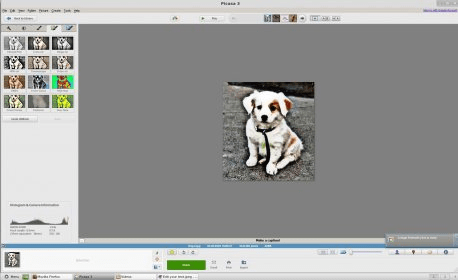
General view General view Main screen Main screen Main screen 2 Main screen 2 Main Interface Main Interface
All 21 screenshots

Latest comments

Guest #23415105(beginner) 21 days ago 
Very good photo viewing software.
Reply
Guest #23298846(beginner) 2 months ago 
Very nice and useful software. I'm impressed.
Reply
Guest #22159217(beginner) 5 months ago 
The best photo editor.
Reply
Add new comment All 33 comments

E-mail Address:

Password:

Register now »

Forgot password?

Sign in with:
Facebook Account
Download Software Informer Client
The Big Brother is Watching You on Facebook
Sullen figures of soldiers in gas masks, crooked backs of grimy people, violent...
Made by Google
I became a fan of Google about one year ago. All the applications developed by Google...
Lively Mosaic
Making a collage is something where you can fully use your imagination and show your...
All articles
Copyright © 2012, Informer Technologies, Inc. About| Terms & Privacy| FAQ| Feedback & Support| For Developers